Learn Center
What is an Internal Knowledge Base
Support reps, sales teams and new hires all need the same thing: fast answers to questions someone else in the company has already solved. But what happens when teams do not have access to information when they need it? Implementing an efficient knowledge management system, such as an internal knowledge base, can help organizations move knowledge across teams and avoid departmental silos. Giving employees the materials they need to carry out work tasks without exhausting time and energy can lead to increased employee and customer satisfaction, and better ROIs.

An internal knowledge base, or internal KB, is used by employees within a company to support business activities. This platform acts as a centralized hub to process, store and facilitate the movement of knowledge. The type of information within a KB varies, but shares a common goal of assisting employees with collaboration and productivity.
Unlike external knowledge bases, information on an internal wiki should and can only be accessed by internal team members. All this information is confidential and not available to the public, such as investors or customers. Internal KBs can also allow sensitive information to only be accessed by certain departments or people within the company.
What Should Be Included in an Internal Knowledge Base
An internal knowledge base should hold any material that helps someone do their job. In general, that includes the following types of documentation:
- General company information: office information, company reports, SOPs, supplier and customer contact lists.
- Training and onboarding materials: course materials, onboarding handbooks, new hire FAQs, training manuals, workbooks.
- Media materials: press releases, media images and media lists
- Marketing collateral: templates for digital marketing collateral, brand guidelines, digital content, creative brief templates, marketing strategy, buyer persona, A/B testing plan, KPIs and reports
- Sales collateral: customer-handoff guides, sales pitch decks, brochures, sell sheets, text or video-based case studies, sales process information and sales reports
- Design materials: templates, design guidelines, color codes
- Research materials: consumer reports, surveys and questionnaires, competitor analysis, external studies and insights.
- Company announcements and important information: internal company updates, upcoming events, workarounds and new hire announcements.
- Legal documentation: legal contracts, forms and regulatory requirements.
- Customer service: telemarketing scripts, email and SMS templates, customer onboarding call scripts, customer FAQs, guides and helpful tips.
- HR materials: chain of command and team information, payslips and employee reviews.
Try live template

How to Create an Internal Knowledge Base
The great thing about an internal knowledge base is that it is not a “one-size-fits-all” solution. Instead, you want a platform that is tailored to your organization’s exact needs and aligns with the culture. Here are a few steps to create an internal knowledge base:
Step 1: Create your organization’s knowledge management strategy
A company’s knowledge management strategy is a systematic approach to processing, storing and managing information. Before creating an internal knowledge base, companies must first determine their business objectives, such as promoting collaboration or increasing productivity. A KM strategy will document the steps needed to produce visible and tangible results for the organization’s overall strategy.
Step 2: Set up teams and determine access
When done right, an internal knowledge base can help foster collaboration and build a sense of community through shared knowledge. When employees are given access to information outside their departments, it can promote brainstorming for better ideas. At the same time, it is important that access to some files are restricted, especially for sensitive content. For instance, HR managers should restrict payslips and employee reviews in order not to cause conflicts.
Step 3: Decide what goes in and what doesn’t
As a general rule of thumb, information in an internal knowledge base should be easily accessible by the relevant teams and easily understandable. The common types of files that go into an internal knowledge base mentioned above can be used as a general guide.
Step 4: Craft implementation steps
To effectively carry out a knowledge management strategy, determine practical action steps to bring it to life. There are a few drivers of growth to consider: the people, machines and culture. For instance, in organizations which do not have a prior culture of knowledge management, it can be helpful to start off with a meeting to communicate objectives and value.
Step 5: Pick the right internal knowledge base software
The type of software you choose for your internal knowledge base is critical to strategy success. There are a few things to consider, including the life cycle and usability of each platform. It is important to understand the benefits and shortfalls of each software, and the types of internal knowledge bases out there.
Examples of internal knowledge base software
- Content management systems
- Company database
- Cloud storage systems
- Web portals
- File synchronization and hosting platforms
- In-browser extensions
- Internal help center
Best Practices for Maintaining Your Internal Knowledge Base
After implementing a KM strategy, following through on these practices helps you get more value from your internal knowledge base.
Some best practices for maintaining your internal knowledge base are:
Promote a culture of feedback
Pay attention to employee feedback in order to identify opportunities for growth and improvement. Allowing for feedback can give insight into any usability issues, potential risks, what’s working and what isn’t. Read more about tips to build a collaborative process to maintain your company knowledge base.
Constantly communicate a clear strategy and message
Knowledge management is a constant process. A deeper understanding of the value of an internal knowledge base is imperative to strategy success. See 5 tips on how to encourage knowledge sharing in the workplace.
Have an efficient structure
An efficient structure will help optimize output and avoid wasting time and resources when employees try to navigate the system. A user-friendly interface can contribute to an overall structure that is easy to understand. Check out our blog post How to Structure Internal Knowledge Base for more best practices sharing.
A simple test: if a teammate cannot find an answer within two searches or two clicks, they will ask a person instead, and the habit of asking instead of searching is hard to undo once it forms. Keep page titles matched to the words people actually search, not internal department names, since that mismatch is the most common reason searches turn up empty.
Achieve organizational goals with Kipwise’s internal knowledge base
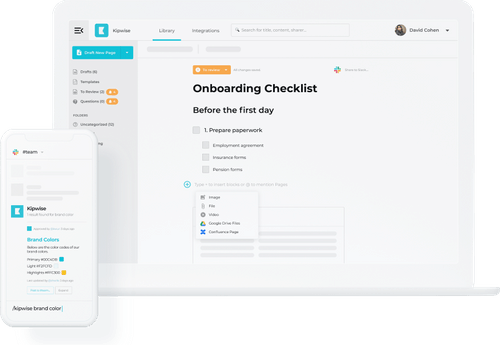
Kipwise’s internal knowledge base software gives your team one place to write, organize and search company knowledge. Find out more on our website today.
Looking for the best knowledge base software?
Join 10,000+ users using Kipwise to better share team knowledge