Learn Center
How to Create an Enterprise Wiki for Your Company
An enterprise wiki puts company knowledge, from onboarding steps to HR policy, in one place your team can search instead of digging through old Slack threads and shared drives. Here’s what to include and how to set one up for your company.
Every business requires employees to possess certain knowledge in order to implement strategies and carry out operations. What happens when teams don't have access to the information they require whenever they need it? Implementing a well-organized enterprise wiki will help companies keep information flowing and prevent silos between departments. The ability to provide employees with easy access to the resources they require to do their job could increase employees’ job satisfaction and have a positive impact on ROI.
What is an Enterprise Wiki?
An Enterprise Wiki, also known as internal wiki or company Wiki, is a centralized information hub where your colleagues share and organize internal company information as well as important team knowledge. Possible things that you want to include in your Enterprise wiki ranges from onboarding checklist, HR policies such as vacation arrangements, meeting minutes, training materials, troubleshooting guides and many more (you can refer to our Enterprise Wiki Tempaltes Gallery for additional examples).
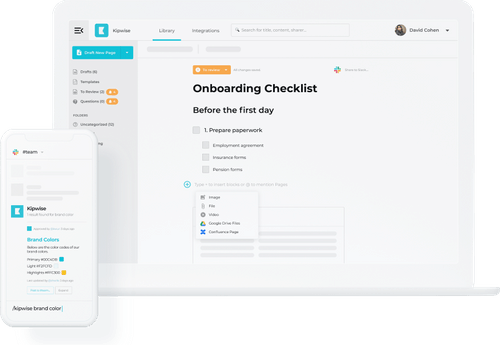
Below is an example of how an enterprise wiki can look like, built using Kipwise, a modern enterprise wiki solution.
The benefits of having an Enterprise Wiki
Creating an enterprise wiki is not an easy task, but it is definitely worth the effort.
Onboard new teammates more quickly
Having an enterprise wiki can help you onboard new teammates more quickly. With an enterprise wiki, everything that they should know to get up and running for their role can be found in one centralized place. This way, they can focus their energy on really learning the materials instead of wasting time on finding the materials.
Reduce managers’ workload
An enterprise wiki can also help to reduce managers’ workload. Instead of needing to answer the same question over and over again, they can direct teammates to the enterprise wiki to find the answer for their question. As teammates get used to finding answers in the wiki instead of asking around, the team stays productive even when someone is away on vacation or working from home.
Retain knowledge as employees leave your company
Additionally, having an enterprise wiki allows you to retain information even when things change within the organization. You no longer have to worry that knowledge will be lost when an important teammate leaves the company.
How to create an Enterprise Wiki
Although there isn’t a one-size-fits-all solution in building a enterprise wiki, below are some key steps to implement an internal wiki for your organization:
Step 1: Craft your company’s knowledge management strategy
An organization's knowledge management strategy governs how an organization handles, stores, and manages information. Before implementing an enterprise wiki, a company must first identify their business objectives, for example, promoting collaboration and improving productivity. The KM strategy will lay out the steps that are necessary to produce tangible results to support the overall strategy of the company.
Step 2: Select the right enterprise wiki tool
The kind of software you use to build your enterprise wiki plays an important role in whether you can successfully carry out your knowledge management strategy. There are a lot of options to choose from on the market.
To help you explore the options available, we have put together a list of modern enterprise wiki tools that you can try out. In general, a good enterprise wiki solution should:
- Offer a quick and reliable search
- Integrates well with other software which your team uses. To provide you with some suggestions, the integrations that you could be looking for might include Integration with Slack, Chrome extension, Google Drive Integration and more.
- Have an easy-to-use and intuitive user interface
- It is easy to edit even for non-tech users. It is best if the editor allows real-time collaboration
- Support Version history to allow you to track changes with ease
- Have a content verification flow to make sure that content on your knowledge base is accurate and verified
- Let you create compulsory required readings to ensure important information is read
- Offers Analytics for you to analyze team usage and spot knowledge gaps
Step 3: Determine what should be included in the enterprise wiki
Below are some examples of what should be included in an internal company wiki.
- General company information: office information, SOPs, company policies, supplier and customer contact lists.
- Company announcements: internal company updates, upcoming events, new hire announcements.
- Onboarding and training materials: onboarding checklists, new hire FAQs, training materials.
- Media assets: press releases, media images and media lists
- Marketing collateral: brand style guides, templates for digital marketing collateral, creative brief templates, marketing strategy, buyer persona, A/B testing plan, KPIs and reports
- Sales materials: sales decks, customer-handoff guides, leaflets, sell sheets, customer case studies, sales processes and sales call notes
- Customer support: call center scripts, email templates, customer onboarding call scripts, customer FAQs, troubleshooting guides and helpful tips.
- Design materials: templates, style guides, brand color guidelines
- Research materials: market research, surveys and questionnaires, competitor analysis, external studies and insights.
- Legal documentation: forms and regulatory requirements, legal contracts
- HR materials: HR policies, payslips and employee reviews.
Try live template

Step 4: Create teams and decide on access rights
If done correctly, having an enterprise wiki can foster collaboration and create a sense of community through a better knowledge flow. By encouraging employees to share information with other departments, it can help teammates learn from each other and this can often spark new ideas for brainstorming. But of course, not all information should be shared with everyone. Sensitive information such as employee reviews should only be shared with relevant parties.
A wiki fails less from missing content than from content nobody owns. If a page has no named owner, nobody updates it when a process changes, and teammates stop trusting search results because half of what they find is outdated. Before finalizing access rights, assign an owner to each major section and put a review date on the calendar, quarterly works for most teams, so pages get revisited instead of forgotten.
Step 5: Welcome your team to the tool
When you completed the above, you're now ready to showcase your new enterprise wiki to your team! Begin by writing a wiki page to welcome your teammates and guide them how to use the wiki, which includes:
- An explanation of the purpose behind using this tool
- Every one of the amazing benefits your team can enjoy when using the brand new wiki
- A brief explanation of how this tool will be used going forward
- Quick links to helpful and important wiki articles
- Commonly asked questions regarding the wiki
- Which team members can you approach if you have any questions regarding the wiki
Looking for the best enterprise wiki software?
Join 10,000+ users using Kipwise to better share team knowledge