
How to write a press release
A press release only works if someone reads past the headline. Journalists get hundreds of pitches a day, so one that buries the news in the third paragraph, or leans on hype instead of facts, gets skipped.
This press release template walks through the structure below step by step. It won't fix the most common problem though: an update that only your own team finds exciting still reads like an internal memo no matter how it's formatted, so make sure there's an actual news hook before you start writing.
Types of press releases
There are several types of press releases, each serving a specific purpose. Here are the most common types:
Product Launch Press Release
A product launch press release communicates the introduction of a new product or service to the market. Its primary purpose is to inform the media, stakeholders, and potential customers about the key features, benefits, and availability of the product.
Company News Press Release
A company news press release communicates significant updates or changes within an organization, such as mergers, acquisitions, or changes in leadership. This type of press release is aimed at informing the media, stakeholders, and the public about important developments that may impact the company or its audience.
Event Press Release
An event press release is a formal announcement designed to inform the media and the public about an upcoming event like conferences, seminars, or fundraisers, providing details on date, location, and participation. This type of press release aims to generate interest and encourage attendance or participation.
Crisis Management Press Release
A crisis management press release is a formal statement issued by an organization in response to a significant negative event or situation that may impact its reputation or operations. This type of press release aims to provide accurate information, clarify the organization’s position, and address concerns from stakeholders and the public.
Research or Study Press Release
A research or study press release highlights the findings of a research study or survey. This type of press release aims to inform the media and the public about significant discoveries or insights that may impact a specific field or industry.
Award or Recognition Press Release
An award or recognition press release is a formal announcement that highlights when a company, organization, or individual has received an award or recognition. This type of press release aims to celebrate achievements, enhance credibility, and promote the organization’s reputation.
Partnership or Collaboration Press Release
A partnership or collaboration press release details a new partnership or collaborative effort between organizations. This type of press release aims to inform the media and the public about the goals and benefits of the partnership.
Update Press Release
An update press release provides new information or updates about ongoing projects, initiatives, or changes within an organization. This type of press release aims to keep stakeholders, the media, and the public informed about developments that may impact them.
What to include in a press release
Writing a press release involves a clear and concise structure to effectively communicate your news.
Start with a strong headline that captures attention, followed by a dateline that includes the release date and location. In the opening paragraph, summarize the key points: who, what, when, where, and why. Use the subsequent paragraphs to provide more detailed information, including quotes from relevant stakeholders to add credibility. Ensure the language is straightforward and professional, and conclude with a boilerplate that describes your organization. Finally, include contact information for media inquiries. Keep it brief, ideally one page, and focus on delivering essential facts engagingly.
1. Headline: A catchy and informative title that summarizes the main news.
2. Dateline: The release date and location.
3. Lead Paragraph: A concise summary of the news, answering the who, what, when, where, and why.
4. Body: Detailed information, including:
- Supporting details and facts.
- Quotes from key stakeholders (e.g., executives, experts).
- Background information about your organization.
5. Boilerplate: A brief description of your company, highlighting its mission and key achievements.
6. Contact Information: Include a name, phone number, email, and any relevant social media links for media inquiries.
7. Call to Action: Encourage readers to take a specific action, like visiting your website or attending an event.
Using Kipwise to collaborate on your press releases
Looking for a tool to collaborate on writing your press releases? Try out Kipwise!
- Real-time collaborative online editor - Our online editor supports real-time collaborative editing so your teammates can work on the same document at the same time. With our inline comment function, it’s easy for your teammates to discuss issues and finetune the document together before sharing the announcements with the public.
- Create an online newsroom easily - create a custom-branded newsroom in minutes to host your press releases online.
- Content approval process - you can set designated reviewers for your content so that the press releases will need to get approved by specified teammates to ensure accuracy.
How to use this Kipwise Press Release Template
1. Simply create a Kipwise account via the Start with this Template button at the bottom of this Page
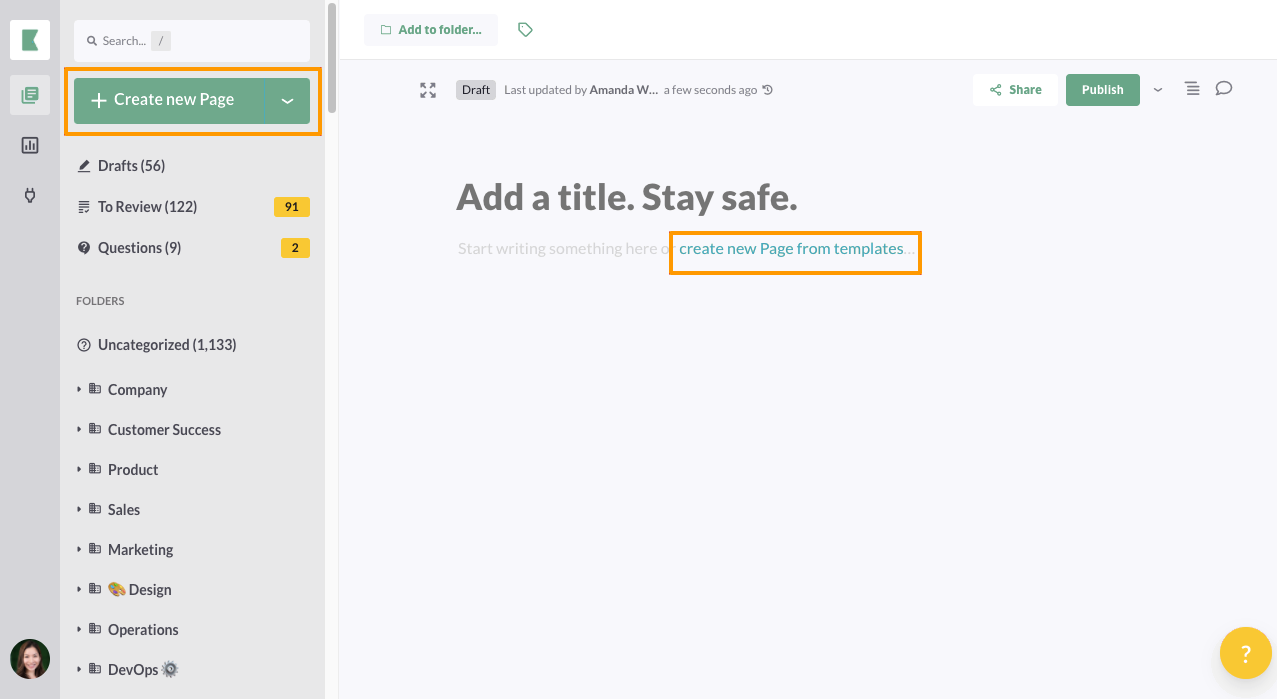
2. After creating your team on Kipwise, create a new Page and select create a new Page from your templates
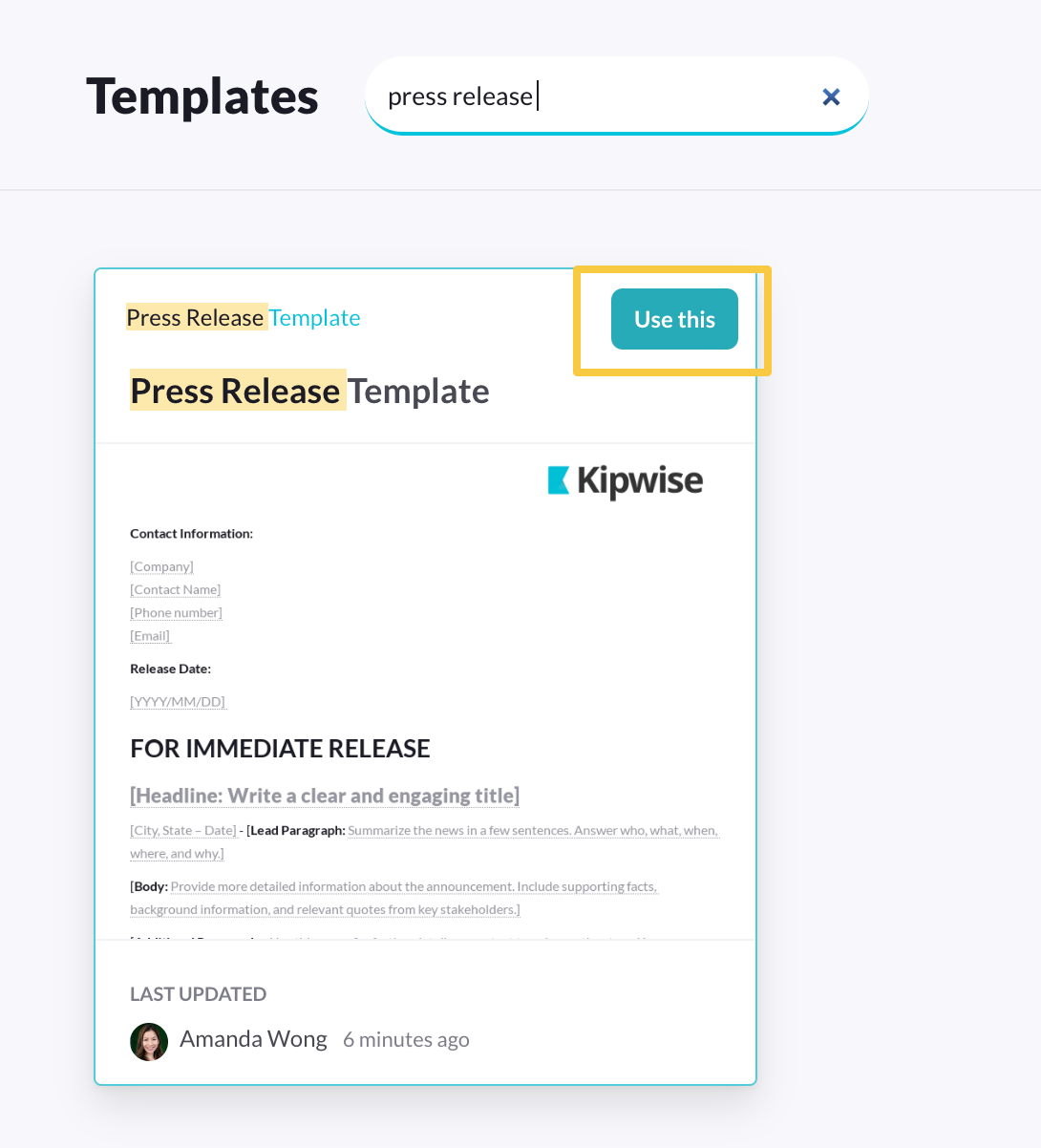
3. Search for “Press Release Templates” and select Use this template
Best practices for writing a press release
A press release competes with a journalist's whole inbox, so it has to earn attention in the first few lines: a strong headline, a lead that states the news, and no padding before it.
The sections below cover headlines, leads, length, quotes and distribution, in roughly the order a journalist actually reads them.
Start with a Strong Headline
1. Be Clear and Concise
- Use straightforward language to summarize the main point.
- Aim for 10-15 words.
2. Highlight the Key News
- Focus on the most important aspect of the announcement (e.g., product launch, award, partnership).
3. Use Action Words
- Use strong, specific verbs instead of generic ones to add urgency and excitement.
4. Include Relevant Keywords
- Use industry-specific terms that will resonate with your target audience and improve searchability
5. Make it Engaging
- Add a unique angle or interesting detail to pique curiosity.
6. Avoid Jargon
- Keep it accessible; avoid technical terms that may confuse readers.
7. Consider Your Audience
- Tailor the tone and style to the interests of your target audience.
Examples:
- Product Launch: "XYZ Company Unveils Revolutionary Eco-Friendly Gadget for Everyday Use"
- Award Announcement: "ABC Corp Wins Prestigious Industry Award for Innovation in Technology"
- Partnership: "Leading Firms ABC and XYZ Join Forces to Enhance Sustainable Practices"
By following these tips, you can create a compelling headline that captures attention and encourages readers to engage with your press release.
Write a Compelling Lead
A reader decides whether to keep reading in the first sentence, so the lead carries most of the weight. Here’s how to craft one:
1. Get to the Point
- Start with the most important information: who, what, when, where, and why.
2. Use Strong Action Verbs
- Make the lead dynamic by incorporating active language that conveys urgency or excitement.
3. Highlight the News
- Focus on the unique angle or significant aspect of the announcement that sets it apart.
4. Keep It Concise
- Aim for one to two sentences that succinctly summarize the news.
5. Engage the Reader
- Pose a question or make a statement that sparks interest and encourages further reading.
6. Include Relevant Details
- Mention any key statistics or quotes that reinforce the importance of the news.
Example Structure:
- Who: The organization or individual involved.
- What: The announcement or event.
- When: The date or timeframe.
- Where: The location, if applicable.
- Why: The significance or impact of the news.
Example Leads:
- "XYZ Company launched its innovative new app today, designed to help users track their environmental impact, at a special event in San Francisco."
- "ABC Corp has been awarded the Industry Innovation Award for its groundbreaking renewable energy technology, announced at the National Energy Conference."
By following these guidelines, you can create a strong lead that captures attention and effectively communicates the essence of your press release.
Keep It Concise
Journalists skim before they read, so a bloated press release gets skipped. A few ways to keep it tight:
1. Stick to the Essentials
- Focus on the most critical information: who, what, when, where, and why.
2. Use Short Sentences
- Aim for clarity and simplicity by keeping sentences direct and to the point.
3. Avoid Jargon
- Use plain language to ensure that your message is easily understood.
4. Eliminate Redundancies
- Remove repetitive phrases or unnecessary words that don’t add value.
5. Limit Length
- Keep the entire press release to one page, ideally around 400-600 words.
6. Use Bullet Points
- For lists or key details, bullet points can convey information clearly and quickly.
7. Edit Ruthlessly
- After writing, review and cut any superfluous content. Ask yourself if each word serves a purpose.
8. Prioritize Information
- Place the most important facts at the beginning and follow with supporting details.
Example of Conciseness:
Less Concise:
"XYZ Company is excited to announce that they have developed a new product that will help consumers save time and money."
More Concise:
"XYZ Company launches a new product designed to save consumers time and money."
By applying these techniques, you can create a concise and impactful press release that effectively communicates your message.
Use Quotes
Incorporate quotes from executives or stakeholders to add credibility and a personal touch. Use quotes to convey enthusiasm, vision, or personal stories that resonate with the audience.
Example Structure
- Lead-In: "According to [Name], [Title] at [Company]:"
- Quote: “This product will revolutionize how consumers interact with technology.”
Example Usage in a Press Release
"We are thrilled to introduce this innovative solution," said Jane Doe, CEO of XYZ Company. "It will not only enhance user experience but also set a new standard in the industry.”
Focus on Newsworthiness
If a journalist can't tell why your news matters from the first line, they move on. A few ways to sharpen the newsworthiness:
1. Identify the News Angle
- Determine what makes your announcement significant. Is it a product launch, a partnership, or an award?
2. Consider Timeliness
- Highlight how your news relates to current events, trends, or industry developments.
3. Highlight Benefits
- Emphasize the impact of your news on your audience, stakeholders, or the community.
4. Use Data and Statistics
- Include relevant metrics or research findings that support the importance of your announcement.
5. Include a Unique Perspective
- Offer insights or viewpoints that set your news apart from similar announcements.
6. Align with Audience Interests
- Tailor your message to what your target audience cares about, ensuring it resonates with their needs and interests.
7. Use Human Interest
- If applicable, include personal stories or testimonials that evoke emotion and make the news relatable.
Example of Newsworthy Focus:
- Less Newsworthy: "Company XYZ has a new product."
- More Newsworthy: "Company XYZ launches groundbreaking eco-friendly gadget, poised to reduce energy consumption by 30%."
By concentrating on these aspects, you can create a press release that effectively communicates its newsworthiness and engages your audience.
Provide Context and Details
A headline and a lead explain what happened; the rest of the release has to explain why it matters. Here’s how to add that context:
1. Background Information
- Offer a brief overview of the organization, its mission, and relevant history. This helps readers understand the significance of the announcement.
2. Explain the Situation
- Describe the circumstances leading to the announcement. This could include market trends, challenges, or opportunities that prompted the news.
3. Include Relevant Statistics
- Use data and metrics to support your points and illustrate the importance of the news.
4. Detail the Impact
- Explain how the announcement affects stakeholders, customers, or the industry as a whole.
5. Use Clear Examples
- Provide specific examples or case studies that demonstrate the relevance or application of your news.
6. Incorporate Quotes
- Use quotes from key figures to provide insight and add a personal touch, helping to contextualize the news further.
7. Keep It Organized
- Structure the details logically, starting with the most important information and then adding context after.
Example Structure:
- Lead Paragraph: Summarize the news.
- Context Paragraph: Provide background information and explain why this news matters.
- Details Paragraph: Include specific details, statistics, and quotes.
Example:
Lead: "XYZ Company has launched a new eco-friendly product aimed at reducing plastic waste."
Context: "With plastic pollution reaching alarming levels globally, consumers are increasingly seeking sustainable alternatives."
Details: "The new product, which uses 50% less plastic than traditional options, is expected to reduce waste by an estimated 1 million pounds annually. 'This innovation represents our commitment to sustainability,' said CEO Jane Doe."
End with a Boilerplate
Include a brief description of your organization, its mission, and key achievements
Include Contact Information
Provide a name, phone number, email, and social media links for follow-up inquiries
Utilize Proper Formatting
Use clear headings, subheadings, and bullet points to make the document easy to read
Proofread
Check for spelling, grammar, and factual errors to maintain professionalism.
Key Points to Look For:
- Target Audience: Know who your audience is and tailor the content accordingly.
- Clarity and Simplicity: Avoid jargon; use straightforward language to ensure understanding.
- Timeliness: Ensure the news is current and relevant to ongoing events or trends.
- SEO Considerations: Use relevant keywords to improve online visibility if distributing digitally.
- Call to Action: Encourage readers to take a specific action, such as visiting your website or attending an event.
How to distribute your press releases
Writing the release is half the job; it still needs to reach the people who'll cover it. A few distribution channels to use:
1. Press Release Distribution Services
- Use platforms like PR Newswire, Business Wire, or GlobeNewswire to reach a wide audience, including media outlets and journalists.
2. Email to Journalists and Media Contacts
- Build a targeted media list and send personalized emails to journalists who cover your industry.
3. Social Media
- Share your press release on your company's social media channels (Twitter, LinkedIn, Facebook) to engage your audience directly.
4. Company Website
- Post the press release on your website’s news or media section. This also helps with SEO.
5. Industry Publications and Blogs
- Reach out to relevant industry publications and blogs that may be interested in your news.
6. News Aggregators
- Submit to news aggregator sites like Google News or Reddit to increase visibility.
7. Networking
- Tap your own professional network and industry connections to share the release.
8. Follow-Up
- After distribution, follow up with key journalists to see if they have questions or need more information.
By combining these methods, you can enhance the visibility of your press release and increase the chances of media coverage.